Introduction
There has been significant growth in user experience design and research recently. As more advanced tools become available, designers are always looking for ways to improve their workflows. The use of AI in design, and more specifically, usability testing, is one such field.
AI usability testing is a method for assessing a service or product’s design that makes use of automation and machine learning (ML). Artificial intelligence (AI) allows you to assess user behavior and highlights usability issues in real-time, replacing manual observation and older approaches, which is why many businesses are adopting software testing services to improve product quality and user experience.
Designers may improve modern usability testing in multiple ways with the support of AI. In a fraction of the time, design teams can get greater insights thanks to AI technologies’ processing power and the capacity to handle thousands of events. Partnering with a user experience design agency, leveraging AI consulting services, and integrating advanced technologies helps teams optimize research workflows and provide more robust, evidence-based user experience enhancements for complicated web products through the use of AI-driven analysis.
This article provides an overview of artificial intelligence usability testing with an emphasis on how ML and AI might be applied to user experience design.
What Is AI Usability Testing?
AI-driven usability testing is an emerging method of user testing that relies on machine learning to track user interactions with online services and products. With the use of AI, teams can now collect behavioral insights throughout the user experience, rather than depending solely on manual reviews.
Artificial intelligence improves the process by focusing on every key element of a successful user test. Designers may use AI to monitor clicks, find scroll depth, create navigation paths, and spot concerns. Finding UX trends and error spots can be handled more quickly and automatically with the help of these insights. Testing can be more regular and objective if some parts of the process are automated.
The true worth of AI lies in the value it provides through automated analysis, not merely in its speed. When compared to traditional methods, AI is superior at spotting patterns, classifying behaviors into categories, and drawing attention to recurrent problems. This improves the testing process as a whole while also transforming UX insights by decreasing the amount of manual effort required. Businesses investing in AI development services can further enhance these capabilities by building customised AI-driven testing and analytics solutions tailored to their specific product requirements.
Key Difference: AI Usability Testing Vs. Traditional Methods
AI usability test techniques collect and process data considerably more quickly. Designers can now assess countless interactions with the help of AI and ML. This allows them to pinpoint user pain areas and provide predictive insights, allowing them to identify upcoming issues before they develop. Because of these advantages, AI is perfect for designing ecosystems that operate at a high speed and for continual optimization.
Contrarily, AI is unable to completely replace traditional approaches when it comes to providing a deeper contextual understanding. Human researchers understand sentiments and reasons that influence user actions. In this way, designers’ viewpoints offer valuable qualitative insights that AI cannot replicate.
We might claim that human-driven procedures provide depth, whilst AI delivers breadth, when comparing AI usability testing with traditional user testing methods. AI draws attention to the current state of affairs, while human researchers explain their causes.
Researchers and designers would get the best outcomes via a hybrid strategy. With this strategy, teams may use AI to identify the most pressing concerns, and then they can use more traditional testing techniques to learn more about the problems on a human level. This will help them develop better solutions. By taking this tack, we can be sure that the design process will give equal weight to analytical precision and user feedback.
Types Of Insights Achieved With AI Usability Testing
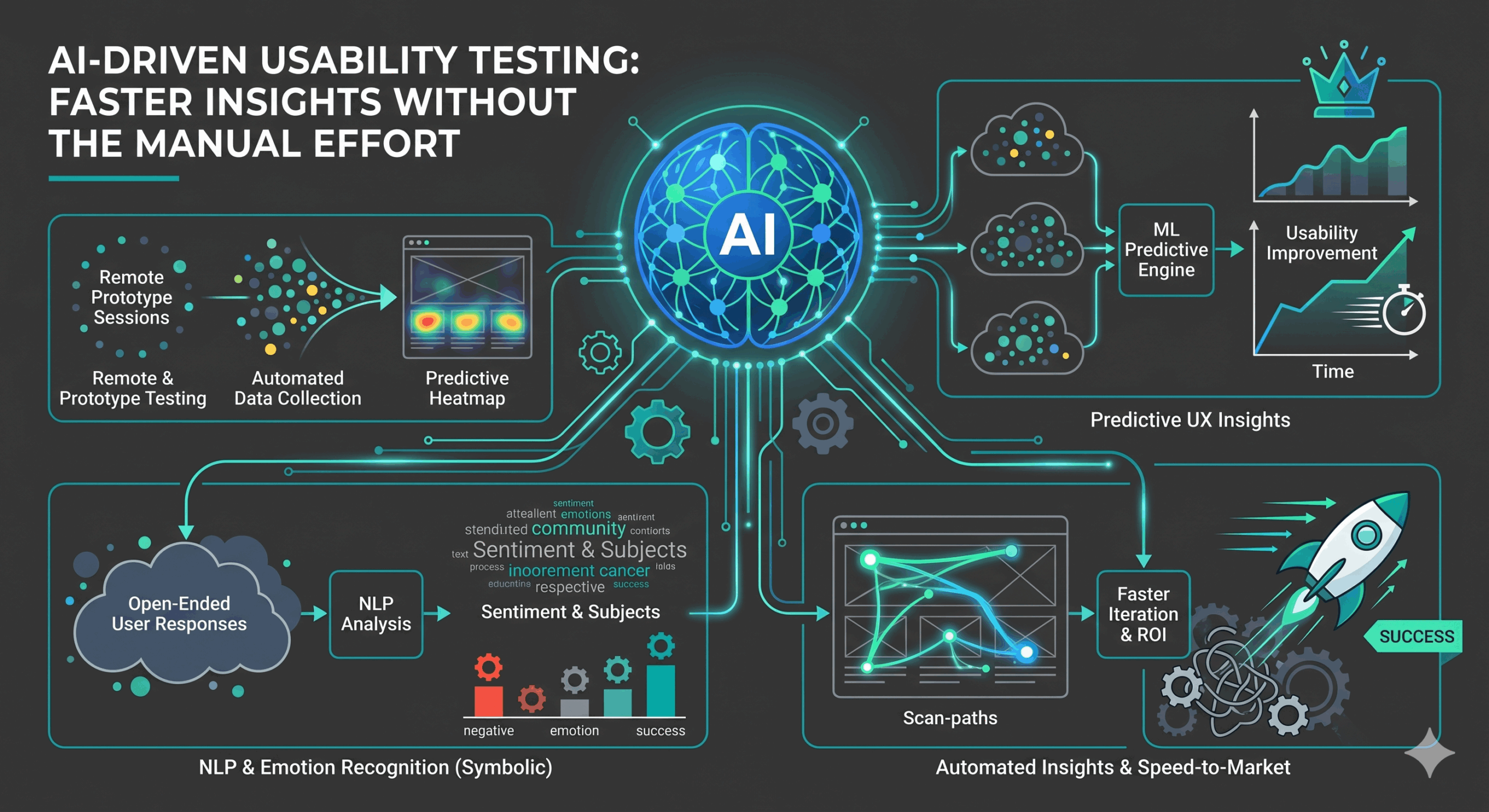
A number of fundamental components are necessary for the effective planning, execution, and assessment of AI usability testing. To better understand user behavior and provide better UX insights, designers are able to use key technologies like machine learning, computer vision, and natural language processing.
Listed below are some of the important, insightful areas achieved by a high-quality AI usability test.
1. Developing Tests And Collecting Data With The Help of AI
Using user journey maps, product details, and audience profiles, AI tools can assist in creating real-world test scenarios. As a result, creating tests becomes easier, and testing covers a wider variety of interactions.
Artificial intelligence (AI) technologies and applications can lessen the burden on human testers by automatically collecting data like clicks, success/failure rates, and user journeys. Teams may drastically cut down on human labor and get more consistent inputs for user experience decision-making by automating data collection.
2. AI Behavioral And Interaction Analysis
Designers can review user activities, such as clicks, heatmaps, and multi-step navigation patterns, with the help of AI tools. By analyzing these trends, we can learn how people really use a service or product. Artificial intelligence (AI) finds insights that traditional methods might miss by effectively digesting massive amounts of data. These insights also support smarter improvements through modern AEO services strategies.
Artificial intelligence can pinpoint the source of difficulty by detecting hesitancy, repeated tries, and sudden shifts of course. As a result of these findings, teams are better able to verify assumptions, enhance user flows, and conduct more precise user testing.
3. Machine Learning For Predictive User Experience Insights
Machine learning models can be controlled by AI. These models might be useful for spotting patterns of user behavior that hint at problems, including endless loops in navigation or recurring mistakes. Machine learning algorithms are able to predict potential problems by analyzing these tendencies, often before they escalate.
Insights like these allow for a more proactive strategy in user experience design. In order to improve results, design teams can prioritise redesign, interaction, and revisions based on anticipated problems.
4. Natural Language Processing For Analyzing User Feedback
Natural language processing (NLP) is a great approach to look into massive volumes of data collected from large surveys or open-ended user responses. Natural language processing may automatically identify sentiments, subjects, and pain areas in user comments rather than requiring human intervention.
To better understand what users value or struggle with, NLP summarizes comments while also highlighting emotional aspects. Usability testing becomes more practical and valuable with this structured information, especially when working with large datasets or languages.
5. Eye Tracking And Emotion Recognition
Eye tracking tools driven by AI show where people look and how long they dwell on particular design aspects, complementing natural language processing (NLP). Whether layouts successfully direct attention or lead to confusion can be revealed by these insights.
Emotion detection enhances the analysis by using face clues, vocal changes, and expressions to figure out annoyance, joy, or uncertainty. When taken as a whole, these signals provide light on cognitive strain and emotional reactions. These are two things that traditional user testing could miss.
6. AI-Generated Heatmaps, Clickmaps, And Navigation Flows
Quantitative and qualitative data, including heatmaps, click patterns, and navigation flow, can be better collected and analyzed with the help of AI. With the use of artificial intelligence, heatmaps can display the parts of a website that receive the most clicks and engagement. The same holds true for click-pattern analysis and navigation flow maps; the former shows where interactions succeed, and the latter shows how people move through each stage.
When compared to manual user testing, the insights obtained from these visual models are more precise and enriched due to AI’s ability to digest thousands of sessions efficiently. During user experience research, it helps teams in locating problems, improving layout structure, and making decisions with more clarity.
Examples Of AI Usability Testing Tools
Advanced tools are being introduced at a rapid pace as AI advances in every industry. This development has benefited several fields, including UI/UX design. Automated analysis, better testing, and the discovery of behavioral patterns that are often missed by manual usability tests are all ways in which AI usability technologies improve UI/UX research.
Listed below are a handful of the most important AI usability tools.
1. Loop11
Loop11 is a well-known usability testing tool that offers organizations insights into how users interact with websites, applications, and other digital products. It provides tools for A/B testing, prototype testing, heatmaps, session recordings, clickstream analysis, and both moderated and unmoderated testing. Product teams, UX researchers, and designers all rely on the platform to get honest customer input and spot usability issues early. One of the main benefits is that you can quickly execute remote usability tests with no complex setup or technical skills needed.
2. Hotjar
Hotjar shows how users engage with a service or product through session recordings and AI-powered heatmaps. Teams may improve layouts and speed up operations with the help of Hotjar’s capabilities, which reveal pain points and patterns in the user journey.
3. FullStory
With FullStory’s expertise in behavioral analytics, designers can effortlessly spot outliers and user annoyances. Its machine learning engine identifies critical points in user sessions and provides insightful data to enhance UX while decreasing the need for human inspection.
4. Mixpanel
One further key tool for testing the AI’s usability is Mixpanel. It offers automated trend detection and predictive analytics. Mixpanel has built-in AI technologies that classify patterns of activity and guide decisions based on data.
Step-by-step Process To Conduct An AI Usability Testing
The strategic process of AI usability testing consists of a well-defined workflow that begins with goal-setting and continues through tool selection, data collection, analysis, and iteration. A process that guarantees practical UX insights is one in which each stage builds upon the previous one.
The following are necessary steps to consider during an AI usability testing process.
Step 1: Establish Objectives And User Cases
Establishing goals and creating a flowchart of important user interactions are the first steps in AI usability testing. Key performance indicators (KPIs) like success rates, time on task, or error frequency should be specified in order to establish the study’s emphasis.
Outlining realistic user scenarios that reflect real-world situations is another crucial part of this process. To better organize testing and guarantee that insights accurately represent user demands and design objectives, these scenarios are useful.
Step 2: Decide on AI Tools
Choosing suitable artificial intelligence technologies for usability testing follows a clear definition of objectives and scenarios. Researcher and designer choices should be in line with the service or product’s blueprint and the nature of the essential insights. In this step, creatives think about what kinds of data, including heatmaps and sentiment analysis, they’ll need to collect and analyze. If the AI technologies are chosen with care, the process can become more effective and profitable.
Step 3: Gather And Analyze User Experience Data
Usability testing sessions start after the tools have been specified. With the help of AI, designers can zero in on user behavior insights by automatically capturing recordings, survey replies, and event logs. The next step in preparing data for analysis is cleaning, organizing, and processing it using AI and ML models.
Step 4: Analyze the AI’s Findings
Where AI models really shine is in their ability to organize comparable actions, spot outliers, and expose user pain spots. With this method, design teams can better organize their ideas and make the most of them.
In this stage, AI systems analyze the data to determine which parts of the design require improvement and then make suggestions for those parts. Teams have more clarity for their design initiatives when they combine statistical results with insights provided by AI.
Step 5: Implement Ux Improvements
Transforming the findings into precise, usable interface updates is the last step in AI usability testing. Simplifying flows, enhancing clarity, or modifying the layout are all examples of what could be considered.
Designers should also prioritise features that have a significant influence on user satisfaction at this stage. Designers can do additional testing to evaluate the upgrades after making the necessary adjustments. This cycle of design and testing improves product quality and guarantees that upgrades meet customer demands successfully.
Final Remarks
On several fronts, AI is changing the face of user experience design and research. User experience (UX) designers can benefit from AI in several ways, including data analysis, user behavior prediction, and the creation of interactive interfaces. Designers now have a solid basis for improving digital experiences thanks to AI tools’ capacity to handle massive datasets and give insights immediately.
But when combined with human knowledge, AI really shines. Understanding context and reasoning in a way that AI can’t is what designers and researchers bring to the table. Humans and AI tools work in partnership to provide a well-rounded strategy that combines thorough analysis with interpretation focused on humans.
Future UX design will be shaped by constant, data-driven improvement, thanks to the accelerating development of AI tools. Rapid adaptation, more intuitive design, and products that change in response to user preferences are the results of teams that combine AI-powered insights with careful human review.

- Automating UX Audits with AI: What Works and What Doesn’t - October 12, 2026
- UX Testing for SaaS Onboarding: Finding Drop-Off Points Before Users Churn - August 4, 2026
- How AI Agents Are Reshaping the Future of UX Research - June 16, 2026
 Give feedback about this article
Were sorry to hear about that, give us a chance to improve.
Error: Contact form not found.