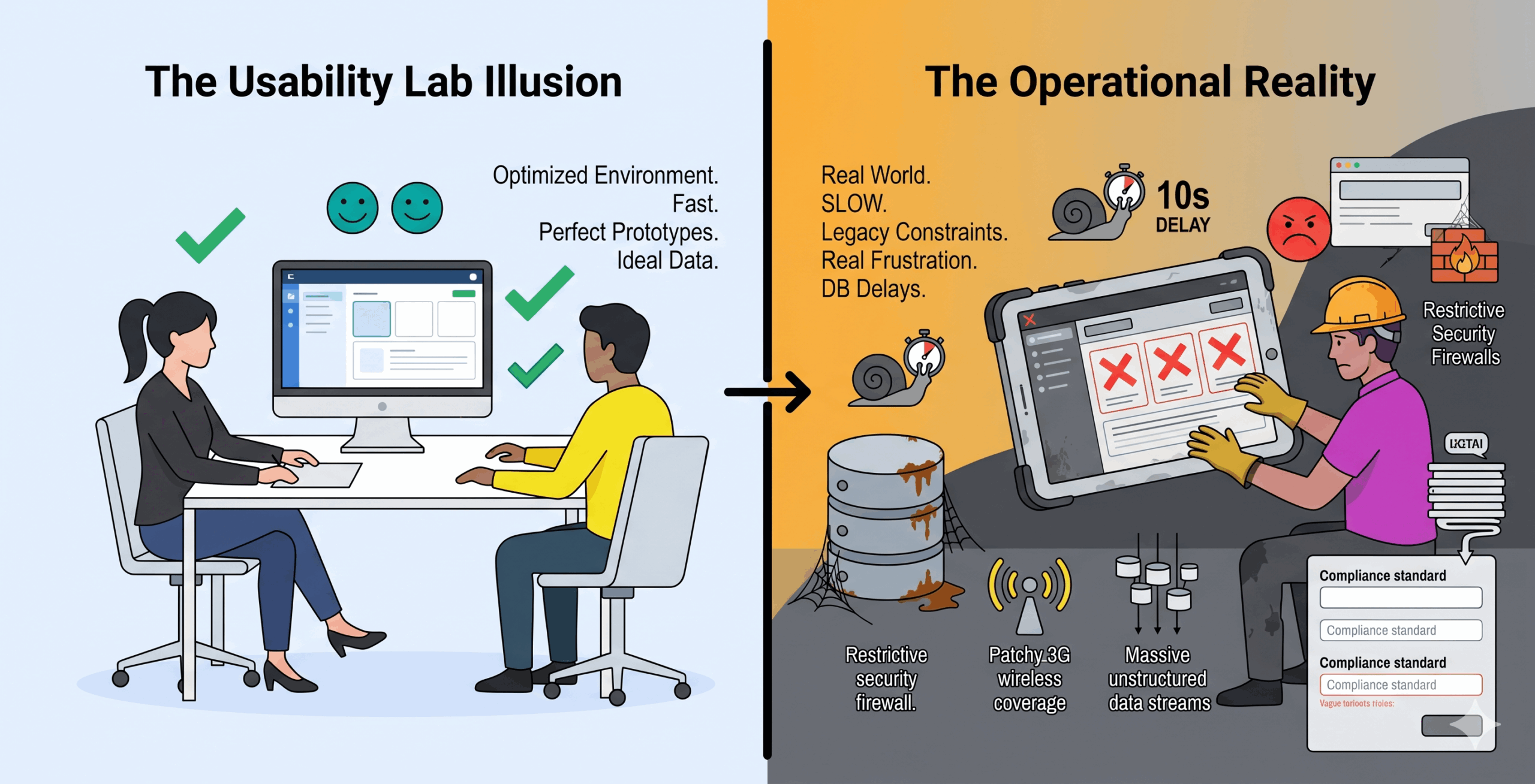
User experience research is often conducted in highly controlled, heavily sanitized environments. We invite participants into quiet rooms or schedule video calls over high-speed internet connections. We hand them perfectly optimized, lightweight prototypes. The interface responds instantly to every single click or gesture. Under these ideal conditions, the research data almost always looks incredibly positive. Users navigate the workflow with ease and praise the clean, minimalist design.
However, a massive disconnect occurs when that same beautifully designed software is deployed in a real operational environment. The sleek interface suddenly feels clunky and unresponsive. The workflow that took two seconds in the usability lab now takes thirty seconds in the field. The users who praised the early prototype are now deeply frustrated by the actual finished product.
This scenario is painfully common in enterprise and B2B software development. The failure does not happen because the design is inherently bad or the users were lying. It happens because the UX research completely ignored the technical context. Missing system constraints will severely skew your research findings and lead your product team down the wrong path. To build products that actually work, research teams must learn how to incorporate real-world technical realities into their testing methodologies.
By involving DevOps services early in the research process, teams can uncover technical constraints and infrastructure limitations that might otherwise be overlooked, ensuring that user insights translate into solutions that are both desirable and technically feasible.
The Illusion of the Clean Room Environment
When we remove software from its technical context, we create a false reality for our users. Consumer applications like social media platforms or food delivery apps often operate in fairly predictable, modern digital environments. Enterprise software, industrial applications, and heavy B2B platforms face a completely different set of challenges. These operational tools must integrate with legacy databases, navigate strict corporate security firewalls, and process massive amounts of complex, unstructured data. This complexity increases further when platforms rely on external content sources like UGC platforms, where content formats, quality, and load behavior can vary significantly.
Beyond infrastructure constraints, the technologies behind a product also shape UX/UI design decisions in direct ways. Frontend frameworks, legacy system dependencies, device limitations, browser behavior, and API performance all influence how interfaces should be structured, how responsive they feel, and what kind of experience users can realistically expect
If your usability test does not account for a ten-second database query delay, your data is inherently flawed. A user might not mind a specific multi-step workflow when the system reacts instantly. Add a realistic ten-second loading screen between each of those steps, and that exact same user will likely abandon the process entirely. The technical constraint completely changes the emotional user experience.
When researchers fail to capture these system limitations, they end up designing for an idealized version of the product that will never actually exist. This leads to massive friction between the design team and the engineering department. Designers hand over a flawless prototype, and engineers immediately have to compromise the user experience just to make the software function within the actual technical architecture. Professional web designers must account for real-world performance limitations, such as database delays, to ensure their designs remain practical and user-friendly.
The Danger of Generic Data Validation
When UX researchers test input fields and software forms, they often rely on simple dummy data. A clean form design can look flawless in a prototype when a test user enters a standard name or a basic product category. However, enterprise engineering software requires far more precision. If researchers do not understand the technical logic behind the industry they are designing for, they can create interfaces that allow serious data errors. In complex product teams, weak validation can cause confusion and misalignment across roles, so it’s important to have clear rules and shared standards to make sure everyone, from engineers to UX designers, understands critical references correctly.
Consider a UX team designing a digital procurement portal for electrical contractors ordering neutral grounding equipment from specialized manufacturers like MegaResistors. If the research team lacks the right technical context, they may leave the “compliance standard” field as open text instead of structuring it around the actual product requirements. That creates room for inaccurate entries, confusion during procurement, and downstream project risk.
In practice, weak validation creates a real liability. A procurement officer might enter a standard or reference that appears credible at first glance but does not actually belong in that product certification field. To a UX designer without industry context, the entry may seem acceptable. To an electrical engineer, the difference is critical. Some references guide grounding practice, while others apply to the product itself, and treating them as interchangeable can lead to specification errors.
If the UX researchers had captured that technical context during discovery, they likely would have designed a validated selection flow instead of a generic text field. In industrial software, that kind of decision matters. Better validation helps procurement teams enter accurate data, reduces the risk of ordering the wrong equipment, and prevents avoidable delays later in the project lifecycle.
The Cost of Ignoring Technical Context
The financial and operational costs of ignoring technical context are staggering. When software fails in the field, companies face massive drops in daily productivity, often disrupting billing and operational workflows. Employees rapidly develop complex workarounds to bypass the frustrating new system. They revert to using paper spreadsheets or outdated legacy tools simply because the new software does not align with their daily technical realities.
For software vendors, this translates directly into high churn rates and highly negative customer feedback. You can spend millions of dollars developing a new platform, but if it cannot function seamlessly within your client’s specific technical ecosystem, they will absolutely not renew their contract.
Furthermore, fixing these contextual errors after the software has been fully developed is incredibly expensive. Redesigning core navigational structures to accommodate an unexpected hardware limitation requires ripping up foundational code. It is significantly cheaper and much more efficient to identify these constraints during the initial UX research phase.
How to Capture Technical Context Properly
Capturing technical context requires a fundamental shift in how research is planned and executed. UX researchers must step outside of the usability lab and actively investigate the invisible systems that govern the product. Here are the most effective strategies for bringing technical reality into your research.
1. Conduct Thorough Contextual Inquiries
You cannot understand an operational environment over a video call. Researchers must physically visit the locations where the software will actually be used. Observe the users interacting with their current tools in real time. Pay close attention to the specific hardware they use. Note the ambient lighting, the noise levels, and any physical protective gear they must wear to do their jobs safely. Watch exactly how long it takes for their current systems to load or process data. These physical and environmental constraints must become the foundational boundaries for your new design.
2. Map the System Architecture Early
UX researchers must collaborate heavily with backend engineers before drawing a single wireframe. You need to understand the data pipeline completely. Ask the engineering team very specific technical questions. Where is the data coming from? How old is the API we are utilizing? Are there known latency issues or server bottlenecks? Does the system lose connectivity frequently in the field?
As teams adopt faster AI-assisted workflows, technical context becomes even more important during planning and implementation. Approaches like vibe coding best practices can help teams move quickly, but without clear requirements, architecture awareness, and guardrails, speed alone can easily produce interfaces that look polished while failing under real-world conditions.
Once you map these technical constraints, you can design an interface that handles them gracefully. If you know a specific search query will always take eight seconds due to a legacy database, you can design a highly engaging loading state. You can manage the user’s expectations directly within the interface instead of letting them think the software has frozen.
3. Simulate Real-World Conditions in Usability Tests
Stop testing your prototypes exclusively on top-tier devices with gigabit internet connections. If your target users operate in a warehouse with patchy wireless coverage, you must throttle the network speed during your usability tests. Use basic network conditioning tools to simulate a weak 3G connection and see how the user reacts to the delay.
If your users interact with the software on older tablets, buy an older tablet and run the prototype on that specific device. If they wear gloves, make your test participants wear gloves during the session. By introducing these artificial constraints into your testing environment, you will immediately discover which design elements fail under real-world pressure.
4. Ask Technical Questions During User Interviews
When interviewing users, do not just ask about their broad goals and emotional frustrations. Ask them specifically about their technical setup. Ask them how often their system crashes or freezes. Ask them what other software applications they have open on their desktop at the exact same time. Understanding their complete digital ecosystem helps you design a product that plays nicely with their existing tools rather than competing with them.
5. Bridge the Gap Between Design and Engineering
The strongest defense against contextual UX failures is a tight, ongoing relationship between your research team and your engineering department. Historically, these two groups have operated in restrictive silos. Researchers gather user data and pass it to designers. Designers create the interface and hand it off to developers. This linear approach practically guarantees that the technical context will be lost in translation.
To capture reality properly, engineers must be invited directly into the UX research process. Have a lead developer observe your contextual inquiries. When an engineer actually watches a user struggle with a slow-loading screen on a noisy factory floor, they gain a deep sense of user empathy. They can immediately identify the backend limitations causing the friction. By learning the vocabulary of your engineering team, UX researchers can ask significantly better questions during user interviews and ensure the final design is entirely technically feasible.
Conclusion
A successful user experience is never evaluated in a vacuum. A beautiful interface is completely worthless if it cannot function perfectly within the strict technical limitations of the real world.
UX research must evolve beyond simple usability testing and preference surveys. It must embrace the messy, complicated reality of legacy systems, hardware limitations, and environmental challenges. By actively capturing and integrating technical context into your research methodologies, you stop designing for idealized scenarios. Instead, you build robust, reliable products that truly empower your users in their actual working environments.

- 7 Tools UX Teams Can Use to Find Where Conversion Journeys Break - September 1, 2026
- How UX Research Helps Companies Enter New Markets With Less Risk - July 27, 2026
- Why Global Teams Need Better Onboarding Journeys, Not Just More Tools - July 13, 2026
 Give feedback about this article
Were sorry to hear about that, give us a chance to improve.
Error: Contact form not found.