The ease with which you can attract and acquire new customers hugely depends on the industry in which you operate. In some niches, building product awareness and encouraging sales happens almost organically (provided you know what you’re doing with your marketing and sales strategies). In others, you have to really work for each sale. And the reason isn’t necessarily your approach to conversion optimization. Instead, your ability to engage and acquire new customers may simply be tied to the fact that you’re selling highly specialized products.
Naturally, there’s plenty that you can do to boost on-site conversion rates. However, investing in user experience design — namely tactics that will help educate potential customers and ease their conversion decision-making process — might just be the best way to reach your goals.
In this post, we’ll break down some of the most effective UX strategies for educating and converting customers. Whether you sell specialized products or operate in highly popular (and well-understood) industries, these tips can help position your offer to align with customer expectations, address and prevent consumer doubts, and guide potential leads toward a positive purchase decision. Let’s get started.
Make Self-Qualification Easy for Prospects in the Early Stages of the Buyer’s Journey
Product understanding is a crucial prerequisite of purchase intent.
When consumers understand what a solution does and how it can benefit them, they are not only more likely to make a positive purchase decision but also willing to pay more for it. With this in mind, implementing UX design strategies that improve product knowledge can have a genuinely positive impact on conversion rates.
But here’s the deal. One of the biggest challenges for brands operating in specialized niches isn’t necessarily a lack of product understanding. Rather, their primary conversion obstacle lies in the fact that most early-stage consumers find it difficult to self-qualify (automatically lengthening or interrupting the already complex sales cycle).
The good news is that education-oriented user experience design tactics may help overcome this challenge. Something as simple as including a ‘Who this is for’ section on your pricing pages can be enough to help prospects in the early and mid stages of the sales funnel self-qualify. If you sell more complex or specialized products, you might need alternative content formats to actively aid the process of product education and evaluation.
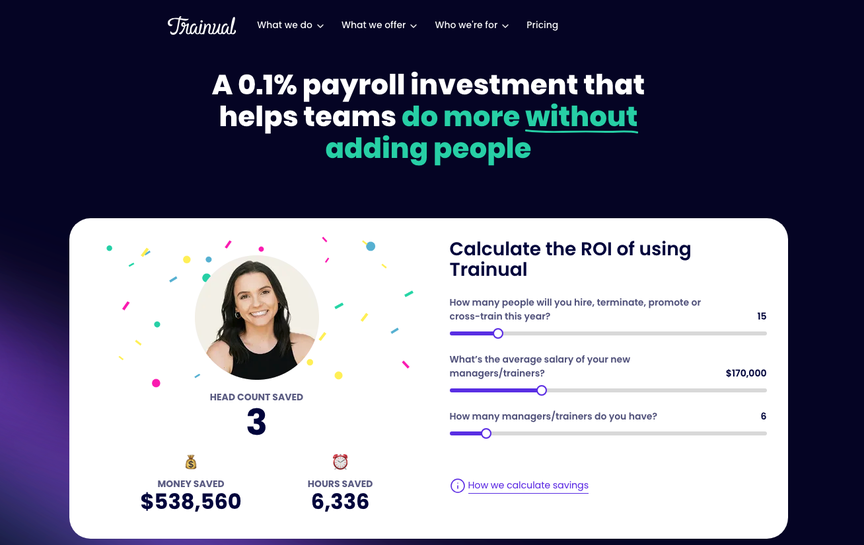
For example, Trainual effectively does both. On its pricing page, it explicitly states that its platform is “best suited for companies with 25 – 1000 employees.” In doing so, Trainual gently informs prospects who don’t fit into that range that the solution might not be the best option for them.
However, from a UX design perspective, the most effective product education element enabling self-qualification for non-expert buyers is the interactive ROI calculator on the brand’s homepage. This element gives web visitors an easy opportunity to estimate exactly how much they could profit from signing up for the AI-powered employee training platform. And it makes it easy for potential customers to determine whether those gains align with what they’re expecting from a solution like Trainual.
Source: trainual.com
Ease Product Selection with High-Definition Collection Page Imagery
In some niches, the biggest obstacle to product understanding or sales isn’t necessarily your target audience’s inability to determine whether your brand offers the type of value they seek. Instead, the most common factor limiting sales is your website’s inability to aid product evaluation in a way that encourages movement through the buyer’s journey.
Naturally, the best way to sell specialized products is to explore opportunities to make their value instantly recognizable to potential customers. But the best method for this can significantly vary across industries and niches.
For instance, consumer behavior research commonly focuses on what consumers want from their purchases and how they evaluate whether a brand can meet their needs.
SaaS buyers, for instance, prioritize security compliance, value for money, clear feature information, and ease of use. In ecommerce, however, things can be far more complex, seeing as they hugely depend on the type of solution you sell and your target audience’s specific tastes and preferences.
One user experience design strategy that can make it easier to attract web visitors’ attention to your offer (and encourage them to recognize its value) is to rely on imagery. The reason for this is simple: 75% of online shoppers rely on product photos to make their buying decisions.
So, if you can use visual formats to communicate the value of your offer early in the buyer’s journey, you can significantly increase your web visitors’ likelihood of converting (and speed up the product selection process).
For instance, if you check out Icecartel’s Men’s Gold Chains page, you’ll find that this business uses detailed, high-quality imagery to ease evaluation. It also allows shoppers to scroll through several photos without navigating to a single product page.
On the one hand, this UX design choice simplifies the product selection process by helping consumers recognize the differences among the many styles of gold chains in IceCartel’s offer. On the other hand, this strategy simplifies the sales cycle by making it easy for shoppers to find precisely what they’re looking for, all the while maintaining a high level of user experience that naturally drives engagement and purchase intent.
 Source: icecartel.com
Provide User-Friendly Educational Resources Across the Buyer’s Journey (Not Just in the Awareness Stage)
One of the biggest misconceptions about the typical buyer’s journey is that it’s strictly linear. Sure, it is true that purchase decisions require gradual progression through the sales funnel. Nonetheless, it’s important to note that shoppers regularly reevaluate their decisions before making a purchase — primarily by going through the product research and selection process several times within a typical sales cycle.
The easiest way to support them during this time isn’t to push them toward a buying decision. Instead, it’s to educate them to the best of your ability so that they can make a choice that fits their needs and that they won’t doubt or regret once the deed is done.
In other words, one of the best UX strategies for boosting sales is to provide user-friendly educational resources across the entire buyer’s journey — especially if your business sells specialized, innovative, or complex products.
This tactic is crucial not only because niche brands require leads to have a deeper level of product knowledge before they are ready to make a purchase decision. Gaining insight into any topic almost always raises new questions that require answers. That’s precisely why educational resources in the bottom stages of the sales funnel can be key to converting new customers.
There are numerous approaches to empowering your leads with information. Product guides, technical documentation, or interactive tools can all be effective at elevating understanding. However, if your priority is to present your target audience with an enjoyable web browsing and shopping experience, it’s always preferable to choose content formats that users enjoy.
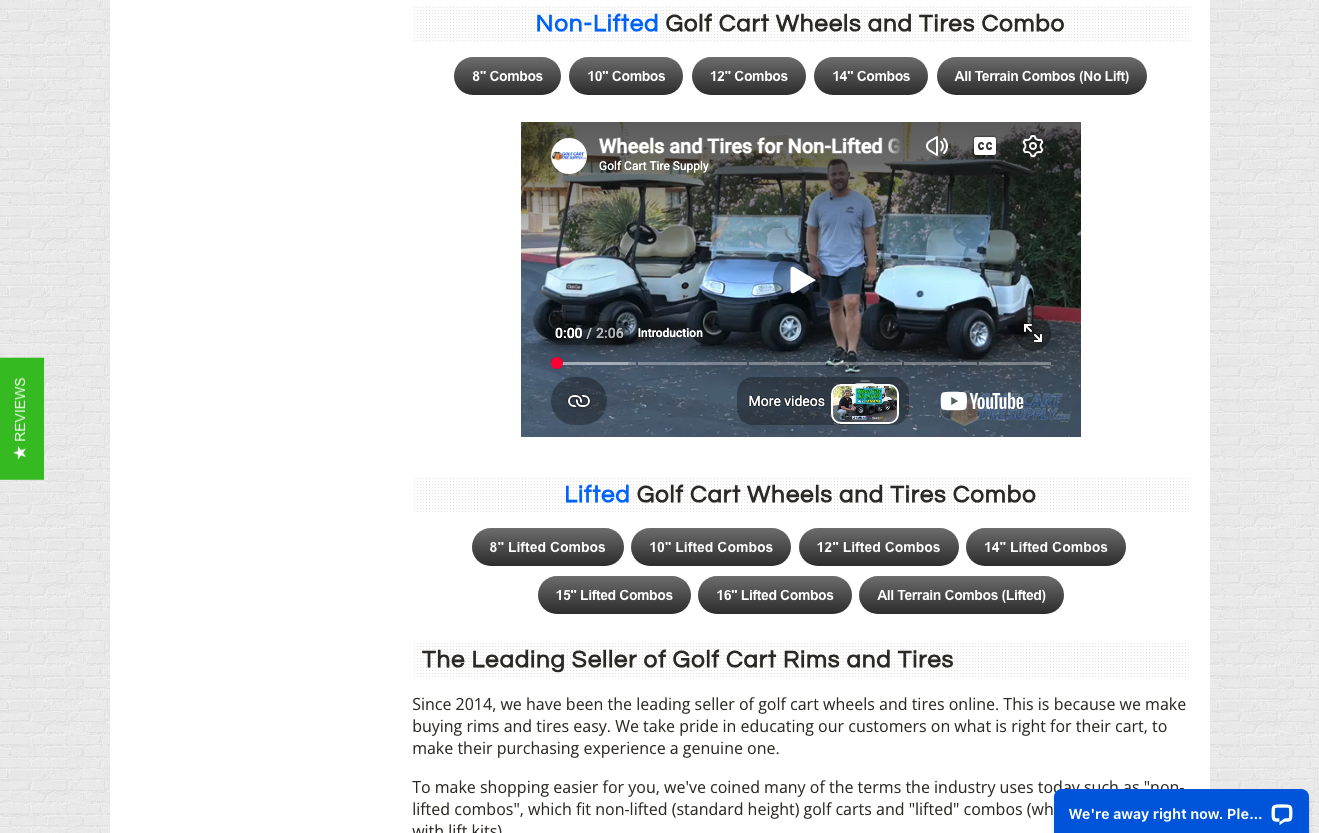
Golf Cart Tire Supply, for instance, does this with videos across its product collection pages like this one. Knowing that this format combines visual instructions and education, the business employs it to help shoppers comprehend the entire process of changing golf cart rims and tires, as well as how different choices affect performance, longevity, and use cases.
Ultimately, the brand’s expertise and willingness to share educational information still stand out (boosting consumer confidence and encouraging conversions). But it’s the format in which the advice is delivered that makes Golf Cart Tire Supply’s approach user-friendly, enjoyable, and effective at driving sales in a highly specific niche of an already complex industry.
Source: golfcarttiresupply.com
Answer Common Customer Questions Before Expecting Web Visitors to Commit to a Conversion
When selling specialized products, it’s almost guaranteed that your potential customers will have some questions before they’re ready to buy. In fact, research suggests that Q&A content is a crucial resource within the typical buyer’s journey.
According to survey data, 99% of consumers read Q&As at least occasionally. 98% do it in addition to reading reviews. And the primary reasons for interacting with Q&As include gaining a better understanding of product performance, ensuring product fit, and getting a better sense of size or sizing.
So, if you’re looking for easy UX strategies that will educate your target audience and guide leads closer to a conversion, it’s only logical that you should answer all or most common customer questions before expecting web visitors to commit to a conversion decision.
There are numerous ways to do this. You can incorporate visually engaging Q&A content into your product pages or draw inspiration from popular marketplaces that let existing customers answer customer questions. However, the simplest method to provide your prospects with the information they need (to overcome their conversion obstacles) is to produce content surrounding the most frequent customer inquiries you receive. Then, make this content easily accessible throughout your website.
LithiumGolfCartBatteries.com, for example, features a simple yet exceptionally detailed (and valuable) FAQ section at the bottom of its product collection pages. The content expertly answers practically all customer questions. It directs shoppers to relevant pre- and post-purchase resources they might find valuable (like the lithium conversion guide video). And it even addresses questions like cost, warranty, and longevity, knowing that these reassurances are hugely important to buyers expecting to spend a couple of thousand dollars on a golf cart upgrade.
 Source: lithiumgolfcartbatteries.com
Enable Easy Product Discovery Regardless of Prospect’s Familiarity with Your Niche
In some industries, the biggest obstacle to selling specialized products isn’t your prospects’ lack of knowledge about your field. Instead, it’s simply that a conversion requires potential buyers to navigate a large product inventory, which can be complicated, daunting, or inconvenient.
In such situations, the best UX hack you can employ won’t necessarily be to give your leads more information about what you offer or how to choose the best solution to their needs. Rather, it’s to provide them with shortcuts that help them avoid irrelevant content, effectively easing the product discovery process and shortening the sales cycle.
User-friendly navigation menus and powerful search bars are perhaps the best elements you can use to accomplish this goal. By enabling web visitors to find what they need through user-centric information architecture, you can effectively elevate the user experience and establish your brand’s role as an entity capable of meeting (even complex) customer requirements.
Sewing Parts Online is one of the best examples of a brand that does this. With an inventory spanning tens of thousands of sewing-related products — including spare parts, tools, furniture, and materials — this brand understands that helping web visitors navigate its online store is essential in preventing customer frustration. So, to make it easy for leads to discover relevant solutions to their pain points, Sewing Parts online employs two prominent UI elements.
The first of these is the brand’s navigation menu, which clearly categorizes products based on function. The second UI component is the brand’s ‘Search Your Machine’ interactive feature, which assists shoppers in finding the spare parts they need by having them begin with a brand, a model, then narrowing their search down to a specific type of part — quickly guiding shoppers to where they want to be instead of forcing them to navigate through several collection pages before finding a product.
Source: sewingpartsonline.com
Highlight Niche Social Proof That Communicates Relevant Trust-Building Information
Finally, when optimizing your site’s UX design to convert new customers, it’s essential to comprehend that selling is practically impossible without first earning customer trust.
Research consistently shows that credibility is a major factor in the typical buyer’s journey, with findings suggesting that 9 out of 10 prioritize brand trust when deciding what products to buy. It’s no surprise that social proof is such a crucial element in trust-building UX design.
However, what’s especially fascinating about earning consumers’ confidence and encouraging them to convert is the type of social proof that works. Edelman’s latest findings established that the most powerful trust-building content includes feedback by people ‘who are not paid by the brand.’ Branded content, independent organizational feedback, influencer content, and AI tools all fall behind in their capacity to earn customer trust.
So, when exploring opportunities to optimize your site’s UX design to drive conversions, pay attention to how you frame your social proof elements. It is no longer enough to simply show off product ratings and reviews. Instead, your trust-building content needs to come from the right source. Moreover, it should be hyper-relevant to your brand’s niche and communicate the type of information your ideal customers trust the most.
If you check out Mind Lab Pro, you’ll find that this brand’s approach checks all the boxes. The brand’s main product page includes feedback from experts and scientists leading the research on cognitive performance (which the brand’s product supports). Even more importantly, Mind Lab Pro highlights that its solution has been selected as the top choice by over 2,000 clinicians who were not compensated for their endorsement.
 Source: mindlabpro.com
Final Thoughts
Selling specialized or niche solutions can be challenging — especially when you also have to overcome challenges like poor product awareness and understanding. But the simple fact is that great UX design can remove a lot of the most common conversion obstacles faced by businesses operating in complex industries.
The UX tips outlined in this guide are an excellent start toward educating your leads about your offer. Moreover, they can be a key aspect of your sales strategy – especially if you combine them with more traditional conversion optimization tactics.

- Selling Specialized Products: 6 UX Strategies for Educating and Converting Customers - August 11, 2026
- How UX Design Shapes Modern Customer Trust - June 23, 2026
- Reducing Cognitive Load: How Simpler UX Drives Better Outcomes - April 20, 2026
 Give feedback about this article
Were sorry to hear about that, give us a chance to improve.
Error: Contact form not found.