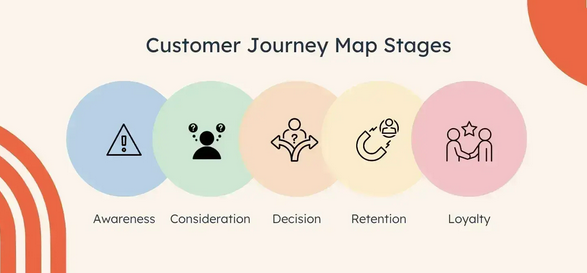
Most customer journey maps are beautiful works of fiction.
They live in board decks, represent “idealized” paths, and rarely survive first contact with a real user. For tech leaders, this gap between assumed behavior and actual data is more than a design flaw. It’s a performance bottleneck that drains engineering resources and stalls growth.
In 2026, UX is no longer a “soft” department, but a measurable engineering discipline. Gartner data shows that 93% of designers already use GenAI tools, and industry leaders project that 75% of customer interactions will be AI-powered by the end of this year. This shift toward a data-driven UX with AI is the single biggest competitive moat for your tech stack.
This guide explores how to move beyond static artifacts and build an operational, AI-enhanced UX engine that aligns product performance with business revenue.
Why traditional customer journey mapping fails at scale?
Traditional journey mapping is often a “workshop-led” exercise, where teams sit in a room with sticky notes and hypothesize how a user moves from discovery to conversion.
While this is great for empathy, it fails in a high-growth environment because it lacks the precision of AI-powered customer journey mapping:
- Static logic in a dynamic market: A map created in Q1 is often obsolete by Q2.
- The “opinion bias”: Internal narratives often replace evidence. Stakeholders map the journey they want the user to take, rather than the one the user is actually forced to navigate.
- Missing micro-frictions: Workshops miss the tiny validation errors or confusing hover states, where 20% of your funnel might be leaking.
The AI shift: We are moving from opinion-based mapping to behavior-based mapping. Instead of guessing, AI allows you to analyze trillions of clickstream data points to visualize the path of least resistance.
Why implement AI-driven user testing strategies into your CX?
To a CTO, AI is only as good as the data pipeline supporting it. You don’t need “prettier” dashboards; you need AI-driven strategies that connect behavioral data (the “what”) to qualitative insights (the “why”).
1. Predictive behavior and pattern detection
AI for customer journey mapping isn’t about heatmaps, but intent signals. AI models can now detect “friction loops,” where a user is trapped in a repetitive navigation cycle or “decision friction” on a pricing page before a human researcher even opens a recording.
- The Impact: Independent research shows that AI-driven predictive insights increase conversion rates by 30%, driven by personalized recommendations and friction reduction.
- Operational Efficiency: Companies leveraging AI in CX for 2026 report up to a 30% reduction in operational costs by identifying and fixing UX bugs before they reach the support desk.
2. Automated synthesis and clustering
Traditional unmoderated testing provides a mountain of video evidence, but watching it is a bottleneck. High-velocity teams are now mastering AI Assistants for user experience designers to accelerate the synthesis cycle through:
- Automated session clustering: Instantly grouping thousands of sessions into “behavioral personas” based on how they interact with your Information Architecture (IA).
- Rapid synthesis: Tools can now deliver structured feedback from hundreds of users in under 48 hours, a process that used to take weeks, as reported by independent research.
- Productivity gains: An Arxiv study shows that high-performing dev teams report being 21% faster with AI than those without such assistants.
What’s the role of AI agents for UX analysis in product management?
Unlike simple analytics tools, these agents act as “middle managers” for your data. A Gartner report highlights that, by 2026, 40% enterprise apps will use task-specific AI agents.
In a UX context, these agents can cross-reference support tickets with session replays. If a user submits a ticket saying “the checkout is broken,” the AI agent will instantly find the sessions experiencing that specific JavaScript error, map the journey they took to get there, and prioritize the fix based on the revenue at risk. This transition from reactive to proactive bug fixing is the cornerstone of conversion-focused UX testing.
How to scale growth with AI-driven A/B testing?
Traditional A/B testing is often slow and “linear.” You test Version A against Version B and wait for a significant difference. On the other hand, A/B testing powered by AI changes the game through Dynamic Traffic Allocation.
As the AI sees Version B performing better for mobile users in Europe, it automatically shifts more traffic to that variant.
According to a HubSpot study, AI drove 42% surge in conversions through personalized CTAs and AI-driven variants. It also reduces the “opportunity cost” of testing. However, there is a risk in pure optimization: Conversion at the cost of the brand. If an AI optimizes purely for clicks, it might suggest “dark patterns” that destroy long-term Lifetime Value (LTV).
Scaling with AI offers a massive competitive edge, but it requires executive maturity to manage its limitations. AI can fall into “context blindness.” It’s about misinterpreting a security pause or a deliberate design choice as “friction” or creating “echo chambers” by over-optimizing for existing power users.
To counter this, you must ensure that your team provides a comprehensive user experience by tracking a dual-metric system:
- Performance metrics: Conversion rate, revenue per visitor, etc.
- Experience metrics: Task completion confidence, Net Promoter Score (NPS), etc.
The roadmap: Transitioning to an AI-enhanced workflow
The transition to AI-driven UX consists of the following four phases:
| Phase | Goal | Strategic Requirement |
| Foundation | Data integrity | Eliminate data silos; 80.8% of redesigns are triggered by low conversion rates. |
| Integration | AI layering | Deploy AI-powered customer journey mapping to find “friction loops.” |
| Scaling | Dynamic journeys | Move from static journey maps to real-time dashboards reflecting current behavior. |
| Governance | Human-in-the-loop | Maintain human validation for high-impact strategic shifts. |
How to master AI assistants for user experience designers?
Technology is only half the battle. The organizational layer requires researchers and designers to evolve their skill sets. Mastering AI assistants for UX isn’t about learning to code, but:
- Prompt discipline: Learn how to ask structured analytical questions of large datasets.
- Statistical validation: Understand when an AI-generated insight is a genuine pattern versus an anomaly.
- Ethical oversight: Identify and correct bias in automated testing cohorts.
As we move toward Generative UI, where interfaces adapt in real-time to a user’s specific journey, the ability to provide a comprehensive user experience will depend on how well your team can guide these AI systems.
Conclusion: Turning AI-driven behavior into a growth engine
Customer journey mapping is no longer just a design artifact; it is the blueprint of your business’s revenue. When you move to a data-driven UX with AI models, you stop building products for “ideal” users and start building them for real ones.
Success in this new era depends on discipline: strong data foundations, AI-powered testing strategies, and a commitment to a comprehensive UX. Organizations that treat the customer journey as a living, data-driven system will outperform competitors by up to 2x in revenue growth (McKinsey).
In a market where experience determines retention, the shift to AI for customer journey mapping isn’t just a trend, but a requirement for survival.

- How Real-Time User Testing Improves Product Development Speed - May 4, 2026
- Data-Driven UX: Using AI to Scale Customer Journey Mapping - March 31, 2026
 Give feedback about this article
Were sorry to hear about that, give us a chance to improve.
Error: Contact form not found.