Users rarely say, “This website has poor information architecture.”
What they say instead is much simpler and far more telling: “I can’t find anything.”
This frustration appears even on websites that look clean, modern, and professionally designed. Navigation menus are well labeled. Pages load quickly. Visual design follows current standards. And yet, users still struggle to locate basic information.
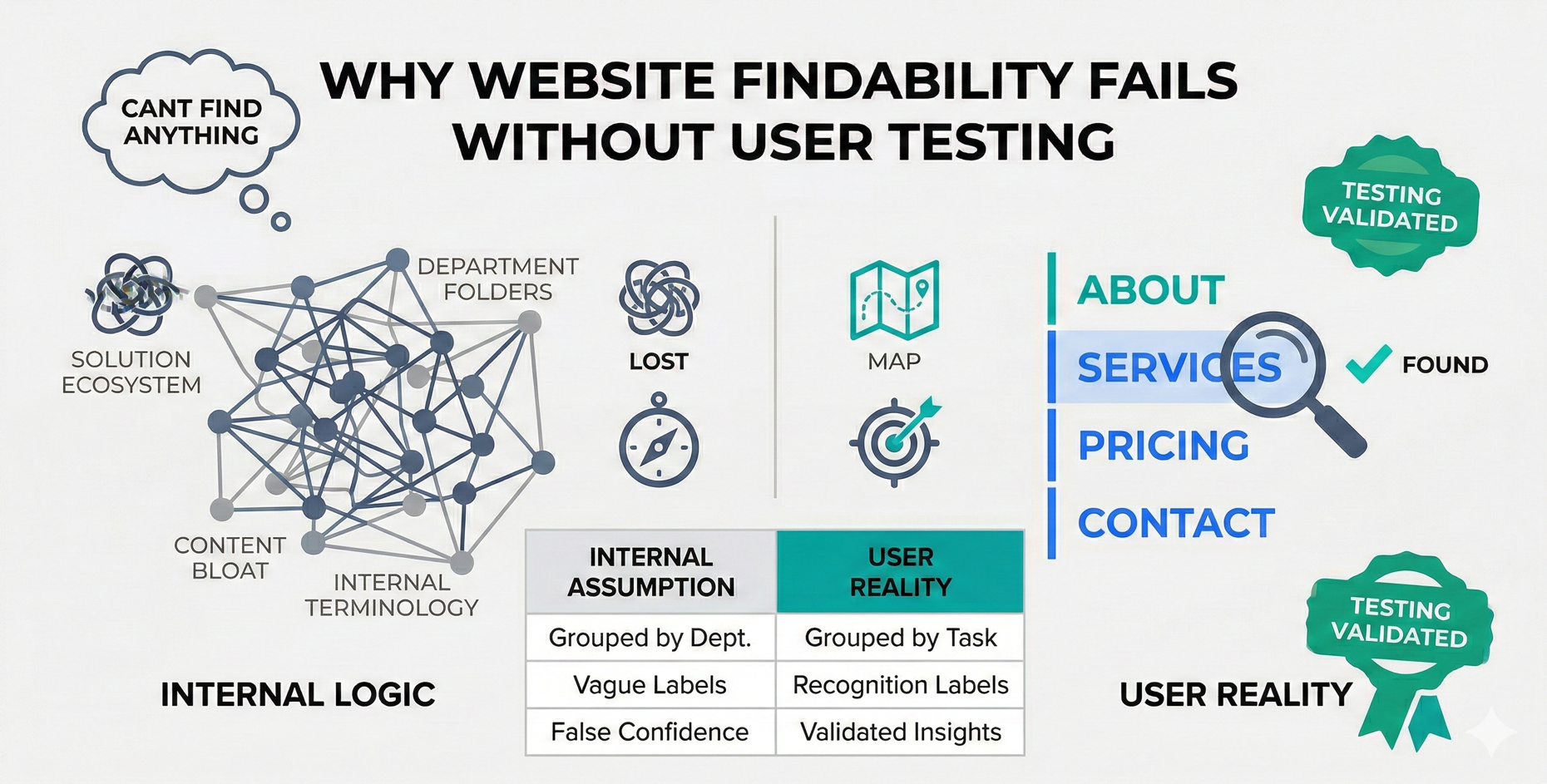
The reason is that website findability is often treated as a navigation or SEO problem. In practice, it is a user experience and research problem. Without direct user testing, teams rely on assumptions that feel logical internally but fail in real-world use.
Findability doesn’t break all at once. It degrades quietly as content grows, priorities shift, and internal logic replaces user mental models. Understanding why this happens is the first step toward fixing it.
What Website Findability Really Means
Findability is not limited to whether a menu label exists or a search bar is present. It describes how easily users can locate what they need without stopping to think.
A findable website allows users to:
- Predict where information will live
- Recognize categories quickly
- Recover easily when they take a wrong path
This depends on more than navigation. It is shaped by:
- Content structure
- Visual hierarchy
- Naming conventions
- Page relationships
- Contextual cues
It is also important to distinguish between discoverability and findability. Discoverability is about encountering something new. Findability is about locating something with intent. Many websites perform well at the former and fail badly at the latter.
Why Teams Overestimate Findability
Most teams believe their website is easier to use than it actually is. This overconfidence comes from familiarity.
Designers, product managers, and stakeholders know the site inside out. They understand internal terminology. They know which pages exist and why. As a result, they unconsciously project this knowledge onto users.
Analytics data often reinforces this false confidence. Page views, bounce rates, and session durations show what users did, not why they struggled. A user who clicks through five pages before finding an answer looks “engaged” in analytics, but in reality they may be lost.
Without user testing, teams mistake internal clarity for external clarity.
The Role of Information Architecture
Information architecture is the foundation of findability. It determines how content is grouped, labeled, and prioritized.
Problems arise when:
- Categories are defined by internal teams rather than user intent
- Content grows without restructuring
- Labels become vague or overloaded
- Similar information is scattered across sections
Flat structures can overwhelm users when too many choices appear at once. Deep hierarchies can confuse users when the path feels endless or illogical. Both extremes create friction.
Early warning signs of architectural breakdown include:
- Users repeatedly returning to the homepage
- Overuse of search for basic information
- Long hesitation before clicks
- Frequent backtracking
These behaviors are invisible without observation.
How User Testing Exposes Findability Problems
User testing reveals what analytics cannot. It shows hesitation, confusion, and misinterpretation in real time. Platforms focused on usability and UX research, such as Loop11, make it possible to observe these patterns early and validate structural assumptions before they become costly to fix. Task-based testing is especially effective for findability.
Instead of asking users what they think, testing focuses on what users do when given a specific goal. This shift from opinion to behavior makes usability issues unmistakable.
Common behaviors observed during testing include:
- Clicking the “wrong” category with high confidence
- Ignoring labels that seem obvious to internal teams
- Relying on search even when navigation exists
- Abandoning tasks midway
First-click behavior is particularly revealing. When the first click is incorrect, the likelihood of task success drops significantly. This makes first-click testing a powerful diagnostic tool for findability issues.
When to Test for Findability
Findability testing should not be limited to redesign projects.
It is valuable at multiple stages:
- Early-stage prototypes, to validate structure before visual refinement
- During content expansion, when new pages are added
- After major navigation or naming changes
- Post-launch, when real-world usage diverges from expectations
Testing after launch is often dismissed as too late, but it is frequently where the most useful insights appear. Findability degrades over time, not just during redesigns.
Translating Testing Insights Into UX Decisions
One of the most common mistakes teams make is applying surface-level fixes to structural problems.
Changing labels without adjusting grouping rarely helps. Adding more navigation items often makes things worse. Real improvement comes from understanding why users made certain choices.
Effective responses include:
- Re-grouping content based on user intent
- Renaming categories to reflect user language
- Adjusting hierarchy rather than adding options
- Clarifying page purpose through visual cues
The goal is not perfection. It is reducing friction at key decision points.
Findability as an Ongoing UX Responsibility
Findability is not a one-time deliverable. It is a system that requires maintenance.
As businesses grow:
- New offerings appear
- Old content remains
- Internal language evolves
- User expectations shift
Without regular testing, navigation drifts away from user reality. Treating findability as an ongoing UX responsibility helps prevent gradual breakdown.
Teams that test periodically spend less time redesigning and more time refining.
Conclusion
Website findability does not fail because teams ignore UX principles. It fails because teams rely too heavily on internal logic and too little on direct user observation.
User testing provides the missing perspective. It reveals how real people interpret structure, labels, and hierarchy. More importantly, it shifts findability from a design assumption to a tested UX outcome.
When users are involved continuously, findability improves naturally. When they are not, even the most polished websites quietly become harder to use.

systems, usability, and digital communication. His work focuses on creating clear, scalable
design structures that support long-term user understanding and brand consistency. Website: https://venkateshprasad.in/
- Why Website Findability Fails Without User Testing - March 4, 2026
 Give feedback about this article
Were sorry to hear about that, give us a chance to improve.
Error: Contact form not found.