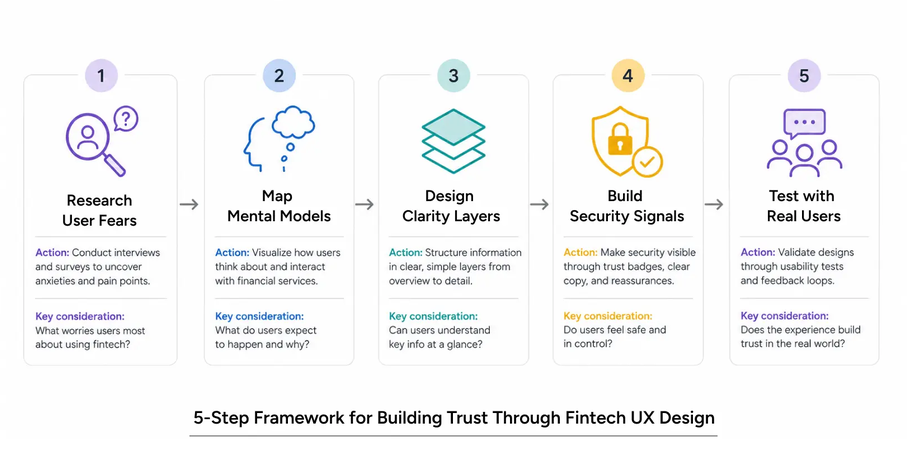
A customer reaches the final screen of a financial app, taps confirm, and completes the task. The analytics record success. Yet the customer may believe that a deposit represents the most they could lose, or that an available balance is money they can safely commit.
Financial UX needs to make consequences understandable before a decision becomes binding. For designers and researchers, this means showing relevant risk beside the action and testing what users believe will happen. The examples below are hypothetical interface scenarios, not financial advice or recommendations.
Why misunderstanding has a higher cost in financial UX
A confusing shopping filter may waste a few minutes. A confusing borrowing or investment flow can create an obligation the customer did not anticipate. An interface can be easy to navigate while leaving the underlying decision misunderstood.
The UK Financial Conduct Authority’s review of consumer understanding emphasises timely, understandable information and testing whether communications work. Its examples include comprehension checks and improvements informed by customer evidence. These are useful research principles; the regulatory framework itself has a specific UK scope.
Start each design review by identifying the misunderstanding that could cause harm. Could someone mistake borrowing capacity for personal cash, overlook a recurring charge, or confuse collateral with a maximum loss? Make that question part of the research brief.
Show risk at the point of decision
A disclosure viewed during onboarding may be far removed from the action it explains. Place the relevant consequence alongside the amount, setting, or commitment that creates it. Keep the essential explanation visible before confirmation, with supporting detail available nearby.
For example, a prototype could separate “Your cash” from “Borrowed funds” and show “Total exposure” beside both. If changing an amount changes the estimated cost or exposure, update the explanation in the same view. Define unfamiliar terms where they appear.
Treat mobile testing as a separate check. A keyboard, sticky button, or expanded panel can leave the confirm control visible while pushing the consequence out of sight. Test larger text and screen readers as well as the default layout. A red number alone cannot explain what a value means.
Translate percentages into understandable consequences
A percentage needs a clear base. Consider a hypothetical securities purchase funded with $1,000 of the customer’s money and $1,000 borrowed. The total position is $2,000. A 10% decline reduces its value by $200, equivalent to 20% of the original $1,000 contribution, before interest and fees.
The interface could display those amounts together, with the assumptions immediately below. Label the calculation as an illustration of mechanics. It is neither a forecast nor a statement of the largest possible loss. Other product structures require different calculations.
The SEC’s Investor Bulletin on margin accounts explains that buying securities on margin can produce losses greater than the initial investment and that a broker may sell securities without consulting the customer. Do not generalize a securities margin example to every leveraged product; the applicable terms and protections matter.
Apply the same clarity to fees. An illustrative 1% transaction charge on $2,000 is $20. State when the charge applies and whether other costs are excluded. Avoid describing a balance as “safe to use” when the interface has no knowledge of the customer’s essential expenses or other obligations.
Make confirmation screens specific
A useful confirmation lets people check the decision they are about to make. Summarize the action, amount, relevant costs, and any consequence that is difficult to reverse. Give users a straightforward way to edit or cancel.
Nielsen Norman Group recommends specific confirmation messages and action labels, while warning that repeated confirmations for routine actions can encourage automatic responses. Reserve interruptions for moments where a pause can prevent a meaningful mistake.
In a transfer prototype, “Send $250” is clearer than “Yes.” For borrowing, show the amount and applicable repayment information before the commitment. Have the product team verify that the displayed summary matches the actual transaction.
A checked acknowledgment is evidence of a click. Whether the explanation was understood remains a research question. Adding another checkbox without testing it can lengthen the flow while preserving the same misconception.
Use usability testing to uncover false confidence
Test with a prototype and fictional funds. Loop11’s guide to prototype testing describes evaluating designs with users before development progresses. Include realistic numbers and consequences so participants can interpret the decision, rather than navigate an empty wireframe.
Recruit people who reflect the intended audience, including relevant differences in financial familiarity and accessibility needs. In moderated sessions, let the participant attempt the task before asking neutral questions. Avoid explaining the risk first: that would test the moderator’s explanation.
Useful questions include:
- What do you think could happen to your own money in this scenario?
- How would you explain the effect of the borrowed amount?
- Which information did you notice before confirming?
- What do you expect the product to do if the position loses value?
- What does “available cash” tell you, and what does it leave out?
For unmoderated testing, collect an open response before showing answer choices that could supply clues. Ask participants to explain their reasoning. Combine their answers with recordings where available; a successful click path cannot reveal every misconception.
Keep task success separate from comprehension. Someone may correctly complete a transfer while misunderstanding its fee. Someone else may understand the consequences and choose to cancel. Record those as different outcomes instead of treating every cancellation as failure.
Measure understanding alongside completion
Before testing, define the concepts users need to understand and what would count as a materially incorrect answer. A practical rubric might distinguish an accurate explanation, an incomplete explanation, and a consequential misconception. Review ambiguous responses consistently across participants.
Record completion, comprehension, and confidence separately. A participant who is highly confident but wrong deserves close attention because an ordinary satisfaction question may miss the problem. Record whether the misunderstanding existed at the decision point or emerged during later questioning.
For a hypothetical study of 12 participants, 11 might complete the flow while only seven correctly explain the exposure. Those are descriptive observations, not population estimates. Investigate the remaining explanations before declaring the design ready.
When comparing designs, evaluate understanding as well as conversion. Change one meaningful feature at a time where practical, document the reasoning, and retest. After launch, review support questions and complaints for misconceptions the study missed.
A practical checklist before launch
Use these questions in a review shared by design, research, product, and the people responsible for financial accuracy:
- Can users find the main consequence before committing, including on mobile?
- Are cash, borrowing, exposure, and costs clearly distinguished?
- Do numerical examples identify their assumptions and avoid implying a loss limit?
- Does the confirmation describe the actual action and provide an accessible exit?
- Have representative users explained the consequences without being coached?
- Have serious misconceptions led to a documented revision and another test?
The release decision should account for the severity of misunderstandings as well as their frequency. A financial interface is ready for closer consideration when the team can explain what users understood at the moment of action, what remains uncertain, and how unresolved problems will be addressed.

market structure, and risk. His writing explores how people understand financial information and
uncertainty.
- How to Design Financial UX That Shows Risk Before Action - October 6, 2026
 Give feedback about this article
Were sorry to hear about that, give us a chance to improve.
Error: Contact form not found.