Design used to have a neat rhythm: research the user, sketch the flow, build a wireframe, test the prototype, fix the awkward parts, hand it to development, launch.
Of course, that process still has value. Early prototype testing is more important than ever. But AI-powered sites are changing what teams need to test and when they need to test it.
A website is no longer only a set of pages, forms, menus, and conversion paths. It may include AI-assisted search, automated support, personalized recommendations, conversational interfaces, and AI agents that navigate the site on behalf of users.
That creates a new design challenge. Teams are no longer testing only whether people can click through a flow. They are testing whether humans and AI-enabled systems can understand the experience, trust it, recover when it fails, and still complete the job.
The new design process is not “replace user research with AI.” It is test earlier, analyze faster, design for uncertainty, and keep improving after launch.
Why the Old Prototype-to-Launch Process Is Under Pressure
The traditional design process often assumes that once the core interface is clear, the rest is mostly execution. AI-powered experiences make that assumption risky.
Users may ask unexpected questions. A chatbot may misunderstand intent. An AI search tool may return a technically correct but unhelpful result. The interface may look clean, but users may not understand what the AI is doing.
So UX teams need to test both the visible interface and the invisible system behavior underneath it.
Start With Prototype Testing Before AI Gets Added
AI does not fix a weak flow. It usually exposes it.
Before teams add conversational search, automation, or personalized journeys, they still need to know whether the basic experience makes sense. Can users find the right page? Do labels mean what the team thinks they mean? Is the primary call to action obvious? Can someone complete the task without needing hints?
That is where prototype testing remains foundational. Testing wireframes and clickable prototypes helps teams see how real people engage with a design before it goes into production. It can reveal hesitation, misclicks, unclear copy, broken expectations, and gaps in the flow while changes are still relatively cheap.
This applies whether the team is building from scratch or redesigning an existing site. If a business is leveraging white label WordPress development expertise to rebuild a marketing site, customer portal, or content-heavy experience, prototype testing can prevent the project from becoming a prettier version of the same usability problem.
The goal is simple: validate the human journey before layering intelligence on top of it.
Test Real Behavior, Not the Happy Path
Many prototype tests are too polite.
They ask users to complete ideal tasks in ideal conditions. The prototype behaves predictably. The instructions are clear. The team checks whether the user can get from A to B.
AI-powered sites need messier tests. Users will ask half-formed questions, search with the wrong words, click somewhere unexpected, and assume the AI remembers something it does not. They may abandon the flow when the system sounds confident but unhelpful.
Our article on testing conversational flows is useful here because it focuses on signals such as hesitation, flow breaks, unexpected inputs, drop-offs, and recovery paths. Those signals matter because AI experiences often fail quietly. A user may not complain. They may simply stop trusting the system.
When testing AI-assisted flows, ask users to behave naturally. Let them search in their own words. Let them try the wrong thing. Watch what happens when the system misunderstands. The recovery path often tells you more than the successful path.
Design for Trust, Not Task Completion
In a traditional usability test, the main question might be: can users complete the task?
For AI-powered sites, that question is not enough. Teams also need to ask: did users understand what happened, trust the result, and know what to do when the system was wrong?
Trust is now part of the interface. If an AI assistant suggests a product, summarizes policy details, drafts an answer, or helps users complete a form, the site needs to explain enough without overwhelming people. Users do not need a technical lecture. They do need clear signals.
What information did the system use? Can the user change the input? Is there a way to retry? Can they undo an action? Is there a human handoff? Does the site admit uncertainty, or does it pretend every answer is final?
The Iceberg UX Model is a strong frame for this shift. The visible UI is only the top layer. The real experience also depends on logic, fallback flows, uncertainty handling, feedback loops, and system trust.
This becomes even more important when managing the complexity of agent systems, where specialized AI agent development knowledge is required to handle permissions, context, and auditability. The agent’s interface is only one piece. The permissions, context, handoff rules, error states, and auditability shape the actual UX.
Use AI to Analyze Faster, Not Think Less
AI can help UX teams move faster after testing.
It can summarize transcripts, group feedback themes, flag repeated pain points, and compare patterns across sessions. This is genuinely useful when teams are working through open-ended comments, recordings, and stakeholder requests.
But AI should not become a shortcut around human interpretation. A summary can tell you that five users struggled with a step. It cannot always tell you why that step mattered, what anxiety sat underneath the hesitation, or which trade-off the business should make next.
The best use of AI in research is not “let the tool decide.” It is “get to the signal faster so the team can make better decisions.”
Prepare for AI Agents as a New Type of Tester
The next design process also needs to consider AI agents as a new kind of participant.
Loop11’s AI Browser Agents point to this shift. AI agents do not interact with websites exactly like humans. They may rely more on structure, labels, machine vision, and logical navigation. A site that feels usable to a person may still create friction for an AI assistant trying to complete a task.
That does not mean AI agents should replace human testing. They should complement it.
Human users reveal motivation, emotion, confusion, trust, and context. AI agents can help expose structure problems, broken navigation, unclear labels, poor task paths, and places where the site is not ready for machine-mediated browsing.
The site still needs to serve people. But it may also need to be legible to systems acting on their behalf.
Benchmark Before and After Launch
A single round of prototype testing is not enough.
The new design process should include benchmarking before and after major changes. That means tracking whether the redesign, AI feature, conversational flow, or agent-ready experience actually improves performance.
Useful metrics include task completion rate, time on task, error rate, drop-off points, satisfaction scores, and support-ticket volume for the relevant journey. For SaaS products, our guide to benchmarking UX is a useful reference because it treats benchmarking as part of an ongoing product cycle, not a one-time report.
Benchmarking also keeps AI honest. If the new AI-powered search looks impressive but users take longer to find answers, the design has not improved. If an automated support flow reduces tickets but lowers satisfaction, the team needs to investigate.
The New Design Process in Practice
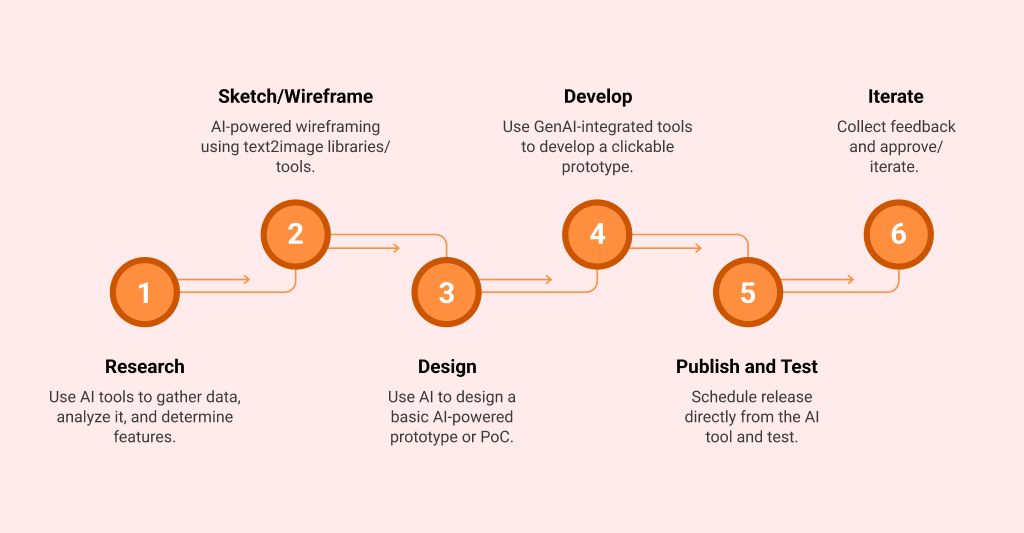
A practical AI-era design process looks more like a loop than a handoff.
Start by defining the user problem and the business outcome. Build a low-fidelity prototype and test the structure, labels, navigation, and task flow before visual polish. Run real-user tests with realistic prompts and tasks, not only clean scenarios.
Only then add AI-powered interactions where they support the journey. That may mean conversational search, smart recommendations, automated help, personalized content, or agent-assisted actions.
Once AI enters the flow, test uncertainty directly. What happens when the system misunderstands? What happens when the answer is weak? What happens when the user wants to change direction? What happens when a human handoff is needed?
Use AI to help summarize research patterns, but keep humans responsible for interpretation and prioritization. Benchmark performance before launch, test again after launch, and keep improving as behavior changes.
The process is not slower. It is more honest about where risk sits.
Wrapping Up
AI is not replacing the design process. It is stretching it.
Prototype testing helps teams catch problems early. Usability testing still reveals what people actually do. Benchmarking still shows whether the experience improved.
What has changed is the range of behavior teams need to validate. AI-powered sites bring new questions around trust, uncertainty, recovery, context, and machine-mediated browsing.
The best design teams will not skip research because AI makes them faster. They will use that speed to test earlier, learn faster, and keep improving after launch.
That is the new design process: prototype carefully, test real behavior, design for uncertainty, benchmark continuously, and make sure the site works for both the humans using it and the AI systems beginning to move through it.

- From Prototype Testing to AI-Powered Sites: The New Design Process - August 18, 2026
 Give feedback about this article
Were sorry to hear about that, give us a chance to improve.
Error: Contact form not found.